• Skip to main content
University of Mary Washington Logo for University of Mary Washington
  • Request Info
  • Apply
  • Visit
  • Admissions
    • First Year
    • Transfer to UMW
    • Nursing RN-to-BSN Program
    • Graduate Admissions
    • Continuing and Professional Studies
    • Visit UMW
  • Academics
    • Majors, Minors and Programs
    • Library & Academic Resources
    • Study Abroad
    • Beyond the Classroom
  • Tuition & Aid
    • Financial Aid
    • Types of Aid
    • Tuition & Costs
  • Life at UMW
    • Arts and Culture
    • Residence Life
    • Campus Dining
    • Clubs & Organizations
    • Health & Wellness
    • Police & Public Safety
    • Career & Professional Development
    • Commencement
  • Athletics
    • UMW Eagles
    • Campus Recreation
  • About UMW
    • Our Mission
    • Our Principles & Values: ASPIRE
    • Our History
    • Leadership
    • Maps & Directions
Quick access
  • Email
  • Directory
  • Calendar
I am a…
  • UMW Student
  • Faculty or Staff
  • Parent or Family
  • Alum
Request Info Apply Visit
Home » Canceling Versus Retracting an Employees Request for Time Off (RTO)

Canceling Versus Retracting an Employees Request for Time Off (RTO)

March 13, 2019 by Sarah Carroll

Audience: SU

Topic: When I need to cancel a request for time off (RTO) for my employee, do I Cancel or Retract the request?

When a RTO has NOT been approved by the supervisor and is still in a “Submitted” status, the employee can Retract the RTO within their My Calendar widget on the day of the request.
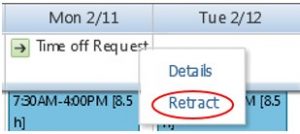
To Retract the RTO:

    1. Navigate to the date for which the RTO was submitted
    2. Use your mouse to hover over the Time off Request
    3. Select the button
    4. Select Retract


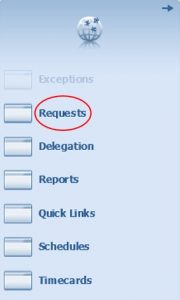
The supervisor can Retract the non-approved RTO from the Requests widget found in the Related Panes bar.

 

If the supervisor has already approved the RTO, it should be Canceled, either by the employee or by the supervisor.

The employee can Cancel the approved RTO within their My Calendar widget on the day of the request.
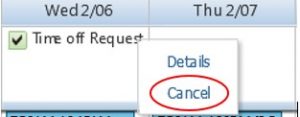
The supervisor can Cancel the approved RTO from the Requests widget when the Status of the request is Approved.

 

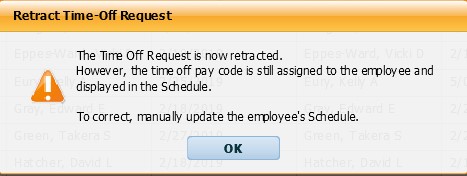
Supervisors should never Retract an Approved RTO!

If the supervisor were to Retract an approved RTO, the approved leave request would remain on the timecard and within the schedule.  The approved leave request would need to be manually removed from the schedule by Payroll (which would remove the approved request from the timecard).  The following warning message will appear when retracting an approved leave request.
___________________________________________________________________

Reference Materials:

Section VIII – Requesting Time Off: To Retract A Time Off Request and To Cancel a Time Off Request of the Timecard Editing Manual

Section VIII – Requesting Time Off: To Retract A Time Off Request and To Cancel A Time Off Request of the Timestamp Manual

Filed Under: All MyTime Minute Posts, Supervisors (SU)

  • Payroll
  • MyTime Training & Instructional Materials
  • Instructional Materials for Cardinal
    • Access Cardinal
  • Payroll Procedures
  • Payroll Calendars
  • Payroll Forms
  • Finance Departments
  • Contact Us
University of Mary Washington Logo for University of Mary Washington
  • Find Us
    • Maps & Directions
    • Campuses & Buildings
    • Directory
  • Services
    • Library
    • Jobs at UMW
    • News
    • Events
  • Resources
    • Title IX
    • Community Relations & Compliance
    • Non-Discrimination
    • Privacy
    • Disclaimer
    • Hazing Policy
    • Consumer Information
University of Mary Washington Logo for University of Mary Washington
Connect
Facebook Icon Twitter Icon Instagram Icon LinkedIn Icon YouTube Icon
Social Media Directory Internal Communications
University of Mary Washington
1301 College Avenue
Fredericksburg, Virginia 22401
© 2015-2025 University of Mary Washington. All rights reserved. Report a problem with this page Home