Register to View Paystubs and W-2s in Cardinal
Cardinal Human Capital Management (Cardinal HCM) is the Commonwealth’s system for human resources, health benefits, time and attendance, and payroll processing. UMW is an interfacing agency, meaning UMW uses Banner and MyTime as the systems of record and sends files from those systems to Cardinal HCM. UMW employees, with the exception of teaching faculty, will continue to use MyTime for keying hours worked, requesting leave and approving timecards.
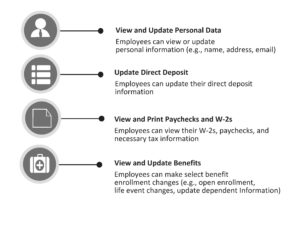
UMW Employees are considered Cardinal HCM Employee Self Service (ESS) users and will use ESS to:
- Key their health care open enrollment selections and changes
- View their earnings notices and W2 forms
- View and/or update personal information
UMW employees must first register and activate their account in Cardinal HCM ESS and establish multi-factor authentication.
If you are an Active employee – follow the Cardinal Registration Guide for Active Employees.
If you are a Retired or Terminated employee – follow the Cardinal Registration Guide for Inactive Employees.
Using SMS text messages or phone calls as a source of multi-factor authentication will be retired April 27, 2026. Follow the Cardinal Okta Verify Multi-factor Authentication guide or the Cardinal Microsoft Authenticator or Duo Authentication Guide guide for establishing your preferred multi-factor authentication type. Note: UMW is a Non-COV Agency. If using Firefox or Safari when accessing Cardinal, you will be required to complete the authentication process twice.
Cardinal link: https://my.cardinal.virginia.gov
The following additional job aids provide information and instructions for the use of Cardinal HCM Employee Self Service (ESS).
ESS Job Aids – Cardinal HCM Employee Self Service (ESS)
- Cardinal System Access Guide
- Managing Direct Deposits
- View Benefits Statements
- View Benefits Summary
- Create a Life Event
- Understanding Your New Paycheck
- View and Print Paycheck or W-2
- Update Dependent Information